
API keys
The board speaks JSON as well as HTML, over an interface that listens on a port of its own, 3001 unless whoever runs the board moved it. Everything you can do while signed in, meaning reading, posting, voting, searching and reporting, can be done through it. Signing up, signing in and signing out cannot, because an API key takes the place of the session entirely.
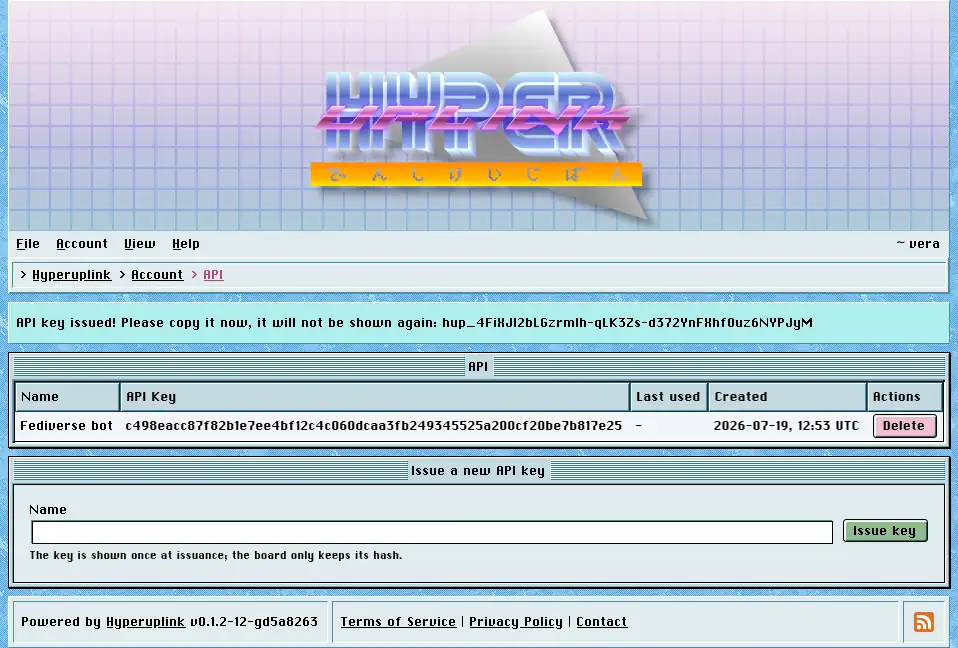
Issuing a key
Account → Security → API lists your keys and issues new ones. A key takes a name, which is there for telling your keys apart rather than for anything the board does with it, and the key itself is shown exactly once, in the message at the top of the page right after it was issued, so copy it there and then. The board only keeps a hash, which is what the API Key column shows. Nobody can read your key back to you, the administrator included, and a key that got away is deleted and reissued rather than recovered.
Last used is updated every time a key authenticates a request, which is how you tell a key in daily use apart from one you created in March and forgot about. Delete revokes a key immediately, and a script still holding it gets a 401 on its next request.
Using a key
Every request includes the key, either as a bearer token or in an X-API-Key
header, and a request without one returns 401 whatever it asked for, because the
API has no guest access:
1curl -H "Authorization: Bearer hup_yourkeyhere" \
2  http://board.example:3001/session
That call returns the account the key belongs to, which makes it the first
call to make when you're checking whether a key works at all. The routes mirror
the pages, address for address, so the front page is /, a topic is
/_general/announcements/welcome-to-the-board and a profile is /~sysop,
exactly as they read in the browser. The front page call lists every category
and forum you may read together with their ids, and that is where the id for
starting a topic comes from:
1curl -X POST http://board.example:3001/new \
2  -H "Authorization: Bearer hup_yourkeyhere" \
3  -H "Content-Type: application/json" \
4  -d '{"name": "Hello", "text": "Written with curl.", "forum_id": "<id>"}'
The board returns the location of the new topic. A key acts as you, it reads what you may read and writes where you may write and nothing beyond that. Handing a key to a script, however, gives it your account, and it needs the same thought as handing over your password.
The page itself: Account → Security → API
