
Manual
Hyperuplink is a modern internet bulletin board reimagined as a single, dependency-free binary, supporting PostgreSQL clusters and without any runtime dependencies, 100% JavaScript free, and based on modern HTML5/CSS.
This manual covers the board as you use it, through its interface, and it is written for the people who post as well as for the people who run the place. Hosting, configuration files and deployment are not covered here, because those are documented in the repository and on hyperup.link, and everything below assumes the board is already running and that you're looking at it.
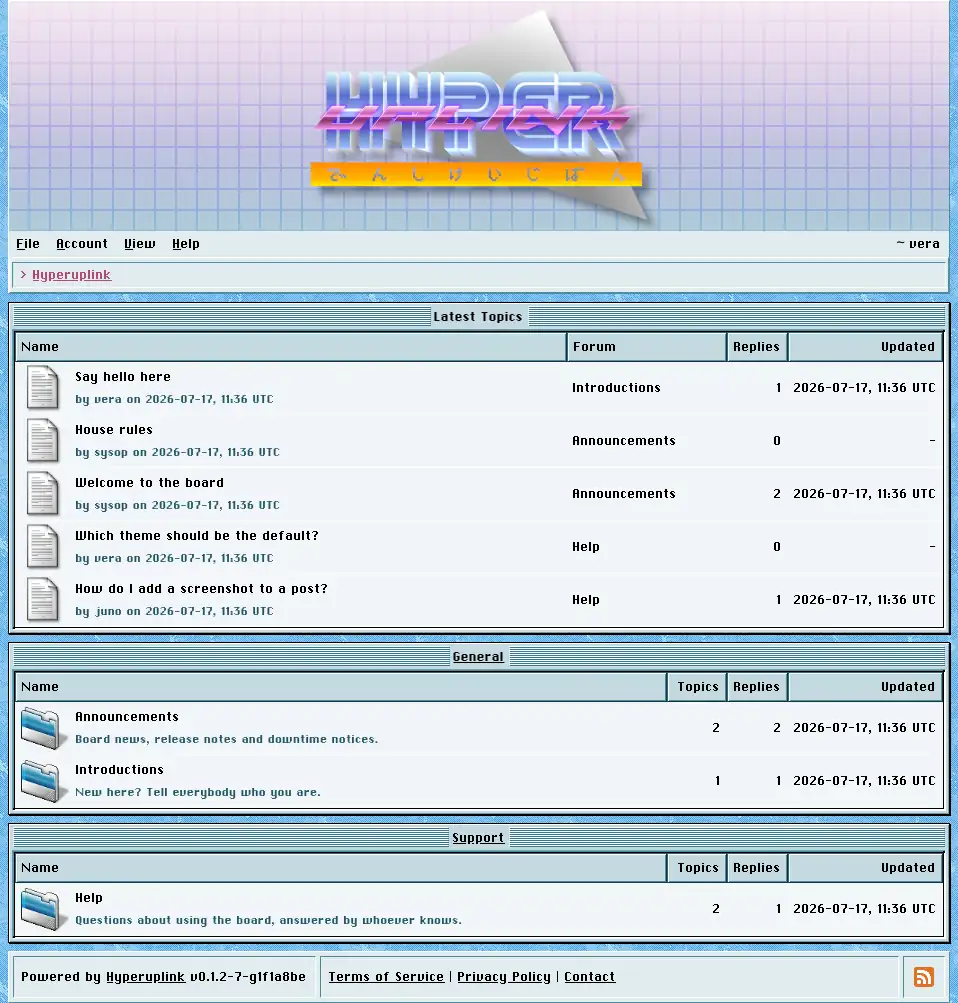
Window
Every page is a window, or a stack of them, and each window has a title bar naming its contents. The menu bar is underneath the banner and is the main way around the board, and the breadcrumb trail underneath it shows where you are and lets you navigate back up. Once you're signed in, your username appears at the right of the menu bar and links to your profile.
Themes decide what the board looks like and colorschemes decide what color it is painted in. The same board can be a macOS 9 lookalike, a Windows 3.x program, or something else entirely, without a single line of markup changing.
Menu bar
File holds New for starting a topic, Search for the board-wide search, and Quit, which is a link out of the board wherever the administrator pointed it somewhere. New stays grayed out for as long as you have write permission nowhere.
Account is where you sign in or sign up while you're still a guest, and where your profile, settings, password, two-factor setup and API keys live once you have an account. Administration shows up for administrators only and holds everything under Administration. Help holds this manual, plus the terms, privacy policy, contact and about pages wherever the administrator filled them in.
View holds three toggles, Banner, Footer and Profile Pictures, and they change how the board is drawn for your account only. They're stored against the account rather than the browser, and they follow you from machine to machine. They change nothing for anyone else.
For users
- Signing up and signing in
- Reading the board
- Writing topics and replies
- Searching
- Reporting a post
- Profiles
- Your account
