
Profiles
Every username on the board links to that user's profile, which is at /~
plus the username, so /~vera is vera's. Your own is reachable from your name
at the right of the menu bar.
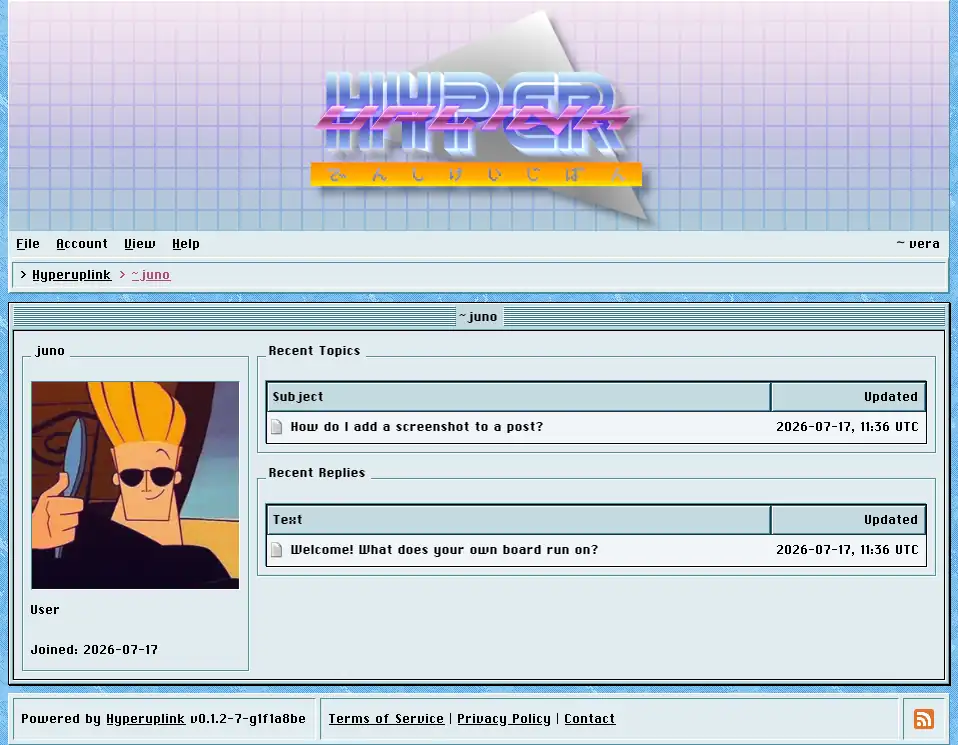
The panel on the left shows the profile picture, the role, the groups the user belongs to, the date they joined, and their signature wherever they wrote one. The role is either Guest, User or Admin. The two lists on the right show their recent topics and their recent replies, each linking to the post.
Administrators see two more panels here. Group membership is a checkbox per group and is where a user is put into or taken out of a group, which is what the permissions then act on. Administrate holds the same confirm, ban, unban and delete actions as Users, and all four are disabled on your own account, so that an administrator cannot ban or delete themselves after misreading which profile they had open.
