
Attachments
Attachments decides whether your users may upload files at all, which files, and where those files end up.
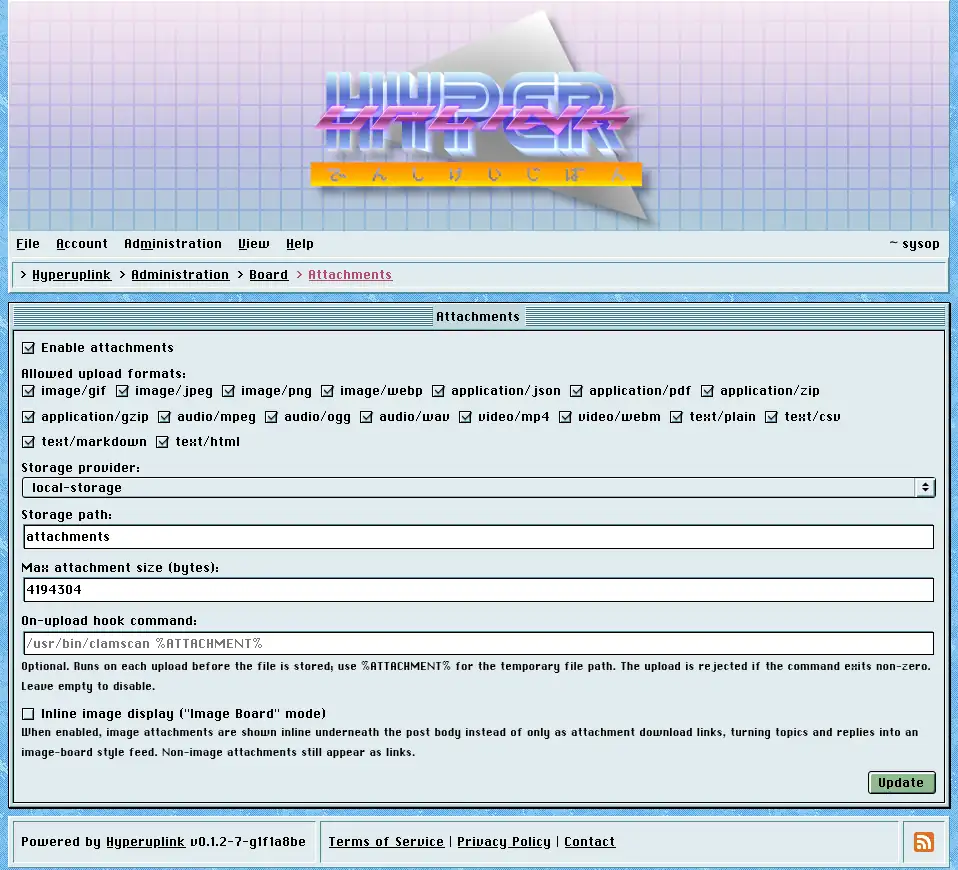
- Enable attachments: adds the file field to the editor. With it off there's no field and no uploads.
- Allowed upload formats: a list of media types, and it works as a whitelist, so a file whose type isn't ticked is rejected however it happened to be named.
- Max attachment size (bytes): in bytes, and anything above it is rejected.
- Storage provider: one of the providers from the board's configuration file, and Storage path is the prefix inside it.
- On-upload hook command: optional, and runs on every upload before the file
is stored, with
%ATTACHMENT%standing in for the temporary file's path. A non-zero exit rejects the upload, which is the hook you hang a virus scanner off. - Inline image display, which the page itself calls "Image Board" mode, renders image attachments underneath the post body instead of listing them as download links. Non-image attachments stay links either way.
Public storage and permissions
Where the storage provider you picked serves files publicly, the page shows a warning. Attachment read permissions cannot be enforced against a public provider, because everyone who guesses the URL downloads the file straight from it without the board ever being asked.
A board whose categories are all readable by everyone loses nothing by this. A board with a members-only category, however, needs either local storage or a private bucket, since the attachments in that category are otherwise protected by nothing more than the length of their filenames.
The page itself: Administration → Board Settings → Attachments
